Remote Job Interview Tips That Actually Work

Written from a recruiter’s desk — for freshers, experienced professionals, and remote job seekers across India.
The best-qualified person on my shortlist lost the job in the first thirty seconds — before I asked a single question.
His window was behind him, so I spent the whole call talking to a dark silhouette. His mic clipped. When he did answer, it was “I’d probably…” and “I think I could…” Someone with half his experience got the offer, because she was set up like a pro and spoke in clear, specific examples.
That’s the hard truth about remote interviews: the strongest resume doesn’t win. The best-prepared person on the call does — and preparation is something you fully control.
Here’s what works.
Quick Answer: How Do You Ace a Remote Job Interview?
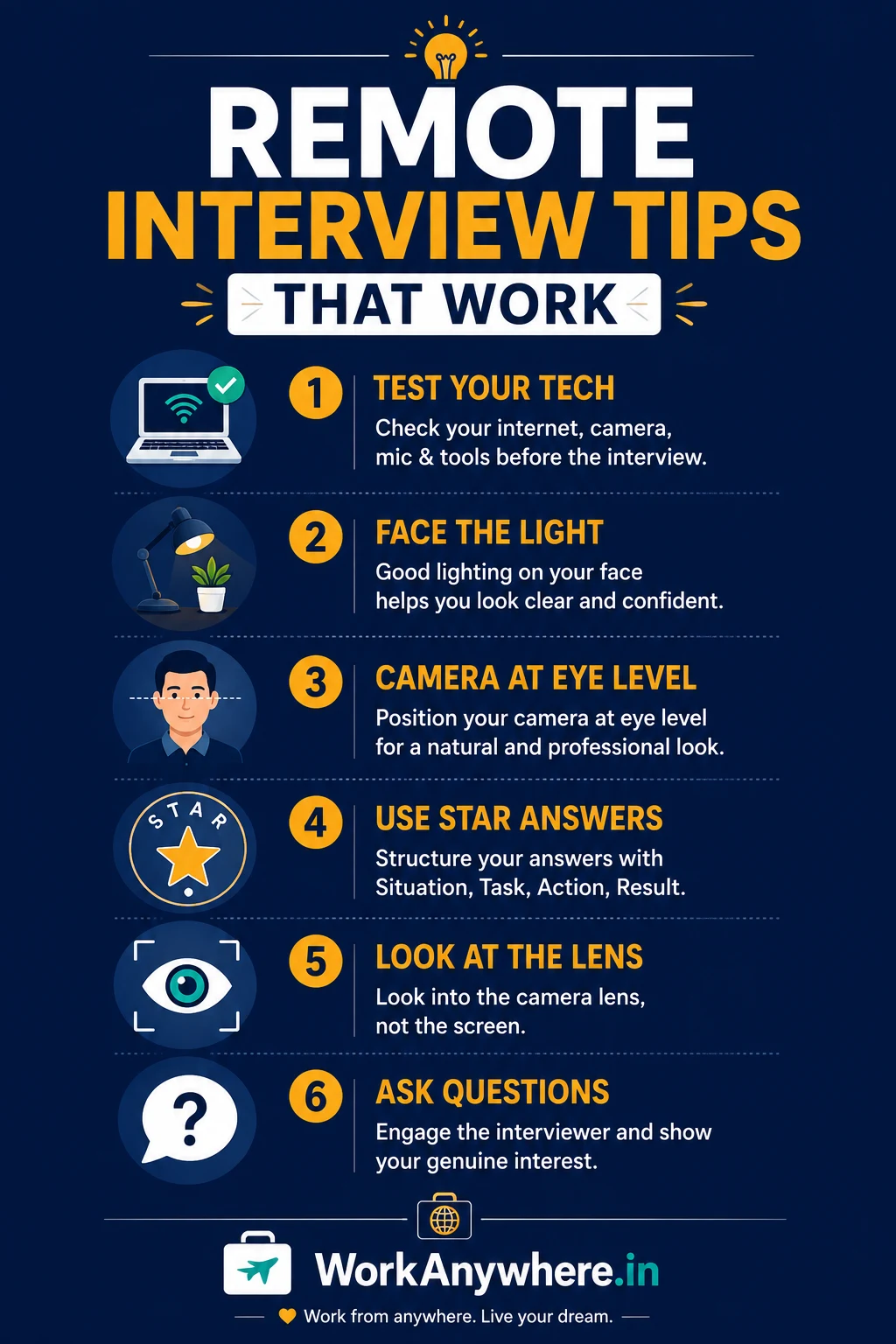
To ace a remote interview, test your tech beforehand, set up a quiet and well-lit space, and answer with specific examples using the STAR method. Show you can work independently across time zones, keep strong eye contact with the camera, and prepare two thoughtful questions. Preparation and clear communication matter more than a perfect resume.

Key Takeaways
- Your setup is part of the interview — tech, lighting, and background all get judged.
- Answer in stories, not adjectives. Use the STAR method with real numbers.
- Remote roles screen for self-management and clear communication above all.
- Look at the camera, not the screen — it reads as eye contact and confidence.
- Always ask questions. Silence at the end signals low interest.
Why Remote Interviews Are Different
A remote interview isn’t just an in-person interview on a screen. It’s a live test of the exact skill the job needs: can you communicate clearly and work well from a distance?
Every glitch, every “sorry, can you repeat that,” every distracted glance sends a quiet signal about how you’ll show up on daily calls. The good news? Most of that is within your control — far more than in a nerve-wracking office interview.
📌 Recruiter Tip: I’m not judging your home. I’m judging whether you took the interview seriously. A tidy, quiet corner and a working mic tell me you’ll be reliable on client calls. That impression forms in the first 30 seconds.
Before the Interview: Your Setup Checklist
Most remote interviews are won or lost before you say a word. Run this the day before — not five minutes prior.
- Test your internet, camera, and mic on the actual platform (Zoom, Google Meet, Teams).
- Find a quiet space and tell others you can’t be disturbed.
- Face a window or light source — never sit with a bright window behind you.
- Raise your camera to eye level (stack some books under your laptop).
- Clean, plain background — a wall or a tidy shelf beats a messy room.
- Close every extra tab and app to stop notifications and lag.
- Keep your resume, the job description, and notes open or on paper nearby.
- Have a backup ready — charged phone with mobile data in case Wi-Fi drops.
⚠️ Warning: The Backlight Trap. The most common setup mistake I see: sitting with a window behind you. It turns your face into a dark silhouette, and the interviewer spends the whole call straining to see you. Light should come from in front, facing you. Fix this one thing and you’re ahead of half the candidates.
During the Interview: What Actually Impresses
Answer in Stories, Not Adjectives
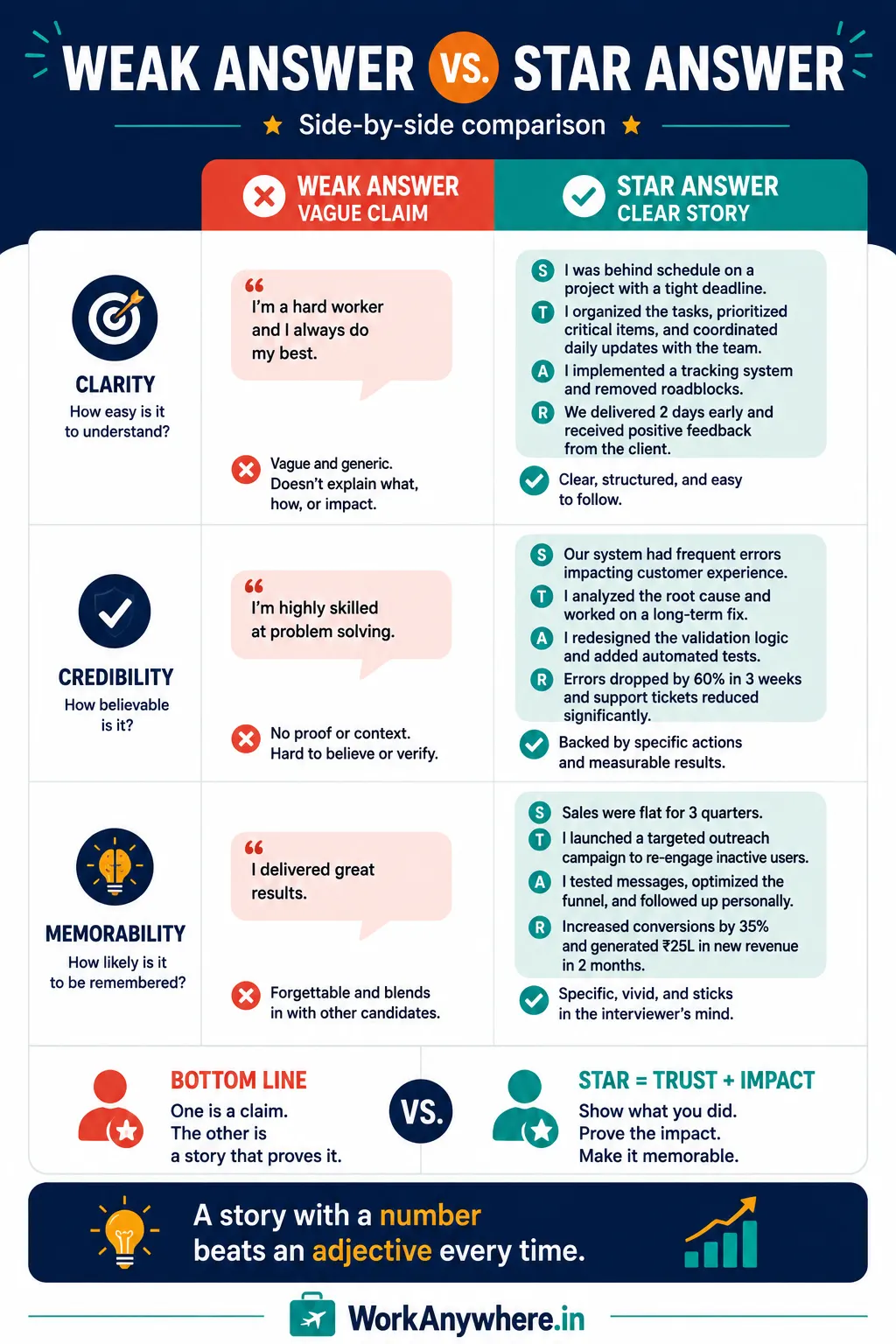
Anyone can say “I’m a good communicator.” Prove it instead. Use the STAR method — Situation, Task, Action, Result — to turn claims into evidence.
| Weak Answer | Strong Answer (STAR) |
|---|---|
| “I’m good at handling pressure.” | “Our team lost a member before a launch (Situation/Task). I took over their tickets and reprioritized (Action), and we shipped on time with zero missed deadlines (Result).” |
| “I’m a team player.” | “When two teammates disagreed on approach, I set up a quick call, mapped both options, and we picked one in 20 minutes (Result).” |
Numbers make stories believable. “Cut response time from 24 hours to 4” beats “improved efficiency” every time.
Look at the Camera, Not the Screen
This feels unnatural, but it matters. Looking at the interviewer’s face on your screen means you appear to be looking down. Looking into the camera lens reads as direct eye contact — confident and engaged. Practice it once and it sticks.
💡 Pro Tip: Put a sticky note with your two best talking points right beside your webcam. When you glance at it, you’re still looking near the lens — so you stay on message and keep “eye contact.” It’s the quiet advantage of remote interviews.
Show You Can Work Remotely
Remote employers have one big worry: will you disappear without a manager watching? Answer it before they ask. Mention how you manage your own time, the tools you use (Slack, Notion, Trello, Zoom), and any experience working with people across time zones. Say “I’m comfortable with async updates and overlapping a few hours with IST-based or global teams.” That single line calms their biggest fear.
Common Mistakes → Impact → Fix
| Mistake | Impact | Fix |
|---|---|---|
| Testing tech at the last minute | Panic when something fails | Test the day before, on the real platform |
| Window/light behind you | You appear as a dark shadow | Face the light source |
| Vague, adjective-only answers | You sound like everyone else | Use STAR with real numbers |
| Looking at the screen, not camera | Reads as low confidence | Look into the lens |
| No questions at the end | Signals low interest | Prepare two specific questions |
| Reading answers off a script | Sounds robotic and stiff | Use short bullet notes, speak naturally |
The End: Always Ask Questions
When the interviewer says “Any questions for us?”, never say no. It’s your last impression — use it.
Ask about the work, not just the perks:
- “How does the team stay connected across time zones?”
- “What does success look like in the first 90 days?”
- “How do you handle communication — mostly async or scheduled calls?”
These show you’re already picturing yourself in the role. That’s exactly the mindset that gets an offer.

After the Interview
Send a short thank-you email within 24 hours. Two or three lines: thank them, mention one thing you enjoyed discussing, and restate your interest. Most candidates skip this. The ones who don’t stay memorable.
Conclusion and Action Plan
A remote interview isn’t about being the most experienced person on the call. It’s about being the clearest, calmest, and best-prepared. Those things are yours to control — and they’re exactly what remote employers are testing for.
Your action plan for your next interview:
- Test your tech and setup the day before, on the real platform.
- Fix your lighting — face the light, raise the camera to eye level.
- Prepare three STAR stories with real numbers.
- Write two specific questions to ask at the end.
- Send a short thank-you email within 24 hours.
Before the interview comes the shortlist. Create an ATS-friendly resume using Smart Resume Studio on WorkAnywhere.in to get the call in the first place — then use these tips to turn it into an offer. Browse the verified remote companies directory to find your next opportunity.
Frequently Asked Questions
How do I prepare for a remote job interview? Test your internet, camera, and mic on the actual platform the day before. Set up a quiet, well-lit space with the camera at eye level. Prepare STAR-method examples with numbers, keep your resume nearby, and have two questions ready to ask.
What is the STAR method in interviews? STAR stands for Situation, Task, Action, Result. It’s a way to answer behavioural questions with a real story instead of a vague claim — you describe the context, what you did, and the measurable outcome. It makes your answers concrete and memorable.
What should I do if my internet fails during a remote interview? Stay calm and switch to your backup — a charged phone with mobile data. Message the interviewer quickly to explain and rejoin. Interviewers understand tech issues happen; how calmly you handle it actually shows your remote-readiness.
Where should I look during a video interview? Look into your camera lens, not at the interviewer’s face on the screen. Looking at the screen makes you appear to be gazing down. Camera eye contact reads as confidence. Placing notes near the webcam helps you stay on the lens.
What questions should I ask in a remote interview? Ask about the work and the team: how they collaborate across time zones, what success looks like in the first 90 days, and whether communication is mostly async or scheduled. Avoid leading with only salary or leave questions.
How do I show I can work remotely without experience? Point to self-managed projects, freelance work, or online courses you completed independently. Mention the tools you know (Slack, Zoom, Notion) and say you’re comfortable with async updates. Self-discipline matters more than a remote job title.
What should I wear for a remote interview? Dress as you would for an in-person interview for that role — usually smart-casual or formal on top. Even remotely, how you present yourself signals how seriously you take the opportunity.
Should I send a thank-you email after a remote interview? Yes. Send a short one within 24 hours: thank them, mention one thing you enjoyed discussing, and restate your interest. Most candidates skip it, so it’s an easy way to stay memorable.