The Complete LinkedIn Profile Checklist
Written from a recruiter’s desk — for freshers, experienced professionals, career switchers, and remote job seekers.
Every working day, recruiters run searches on LinkedIn the way you run searches on Google. “Product manager, fintech, Bangalore.” “Remote content writer, SaaS.” The platform returns a ranked list of people — and your profile is either on it or it isn’t.
That’s the shift most job seekers miss. LinkedIn isn’t a digital resume you upload and forget. It’s a searchable database, and your profile decides whether you surface when the right recruiter goes looking.
I’ve sourced candidates this way for years. Here’s the exact checklist that gets a profile found, clicked, and messaged.

Quick Answer: What Makes a Strong LinkedIn Profile?
A strong LinkedIn profile has a clear photo, a keyword-rich headline, a compelling About section, detailed experience with results, and relevant skills. Recruiters search by keywords and judge profiles in seconds, so findability and a strong first impression matter most. A complete, active profile ranks higher and gets far more views.
Key Takeaways
- LinkedIn is a search engine — the right keywords decide whether recruiters find you.
- Your photo and headline do the heavy lifting in the first few seconds.
- Complete, active profiles rank higher than dormant ones, even with weaker credentials.
- Skills power search. Without them, you’re invisible to keyword filters.
- Small fixes compound: photo, headline, and keywords together transform your visibility.

📊 Quick Statistics
LinkedIn has grown into the world’s largest professional networking platform, with more than 1.3 billion members globally and an estimated 310 million monthly active users, making it one of the most important platforms for job seekers and recruiters.
According to LinkedIn, profiles with a professional profile photo receive up to 21 times more profile views and 9 times more connection requests than profiles without one. A high-quality profile photo can significantly improve your visibility and first impression.
The platform also reports that more than 220 million professionals have enabled the “Open to Work” feature, signaling their availability to recruiters. Additionally, approximately 87% of recruiters use LinkedIn to discover and evaluate candidates, highlighting the importance of maintaining a complete and optimized LinkedIn profile.
Sources: LinkedIn, LinkedIn News, Recruiter Industry Reports.
The Checklist, Section by Section
Work through these top to bottom. Each one is a lever on how easily you’re found and how quickly you’re trusted.

1. Profile Photo
A clear, friendly, professional headshot — face filling about 60% of the frame, plain background, good light. You don’t need a studio; a smartphone near a window works. The single biggest mistake is having no photo at all. <cite index=”11-1″>Roughly half of members still use a default avatar or no photo</cite>, and those profiles pay a heavy visibility penalty.
2. Banner Image
The strip behind your photo is free advertising space, and most people leave it the default blue. Use a simple branded image, your field, or even a clean colour with a short tagline. It signals you actually maintain your profile.
3. Headline (Your Most Important Field)
Your headline is indexed heavily in LinkedIn search and shows up everywhere your name does. Don’t waste it on just your job title. Pack in your role, specialty, and target keywords.
Before: “Marketing Professional” After: “Digital Marketing Specialist | SEO & Content Strategy | Open to Remote Roles”
The second version contains the exact terms a recruiter would search — and states you’re open to remote work.
📌 Recruiter Tip: When I search for candidates, the words in your headline carry serious weight. If you do SEO but your headline only says “Marketing Professional,” you won’t appear when I search “SEO.” Use the language recruiters actually type.
4. About Section
Write it in the first person, like you’re talking. Three short paragraphs: who you are and what you do, your biggest achievements with numbers, and what you’re looking for. Weave in keywords naturally. This is where a real person comes through — use it.
5. Experience
Mirror your resume, but make it human. For each role, add 2–4 bullet points focused on results, not duties. “Grew organic traffic 60% in eight months” beats “responsible for SEO.” Recruiters skim this to confirm you’re the real thing.
6. Skills
Skills power search directly. Add the most relevant ones for your target role — the tools, platforms, and abilities recruiters filter by. <cite index=”10-1″>Listing several relevant skills can significantly increase how often recruiters find you.</cite> Pin your top three to the most important spots.
7. Open to Work
If you’re job hunting, switch on “Open to Work” and — this is the pro move — also put “Open to [role] roles” in your headline text, not just the green frame. Many recruiters filter by headline keywords directly.
💡 Pro Tip: LinkedIn rewards freshness. A profile updated this month ranks above an identical one last touched in 2023. Post or comment even occasionally, refresh a section now and then, and the algorithm keeps you visible. Activity beats a dormant “perfect” profile.
Before → After: Small Fixes, Big Difference
| Section | Weak | Strong |
|---|---|---|
| Headline | “Software Engineer” | “Backend Engineer | Java, Spring Boot, AWS | Open to Remote” |
| About | “Hardworking professional seeking opportunities.” | “Backend engineer with 4 years building scalable APIs. Cut server costs 30% at my last role. Now seeking remote backend work.” |
| Experience | “Handled customer accounts.” | “Managed 50+ B2B accounts, lifting retention to 94%.” |
| Skills | (empty) | “Python, AWS, REST APIs, PostgreSQL, Docker” |


Common Mistakes → Impact → Fix
| Mistake | Impact | Fix |
|---|---|---|
| No photo or a selfie | Fewer views, weak first impression | Add a clean, professional headshot |
| Job-title-only headline | Missed in keyword searches | Add specialty + target keywords |
| Empty or vague About | No personality, no keywords | Write 3 short, keyword-rich paragraphs |
| No skills listed | Invisible to recruiter filters | Add relevant, role-specific skills |
| Duties instead of results | Recruiter skims past | Add numbers to experience bullets |
| Dormant profile | Ranks below active ones | Update and engage occasionally |
⚠️ Warning: The Ghost Profile. The most common LinkedIn mistake isn’t a bad profile — it’s an abandoned one. A profile with no photo, no activity, and a two-line history looks like a dead account, and recruiters skip it. Even if you’re happily employed, keep it complete and lightly active. Opportunities find visible people, not perfect-but-invisible ones.
Your Printable LinkedIn Checklist
Tick every box. If they’re all checked, you’re ahead of most candidates.
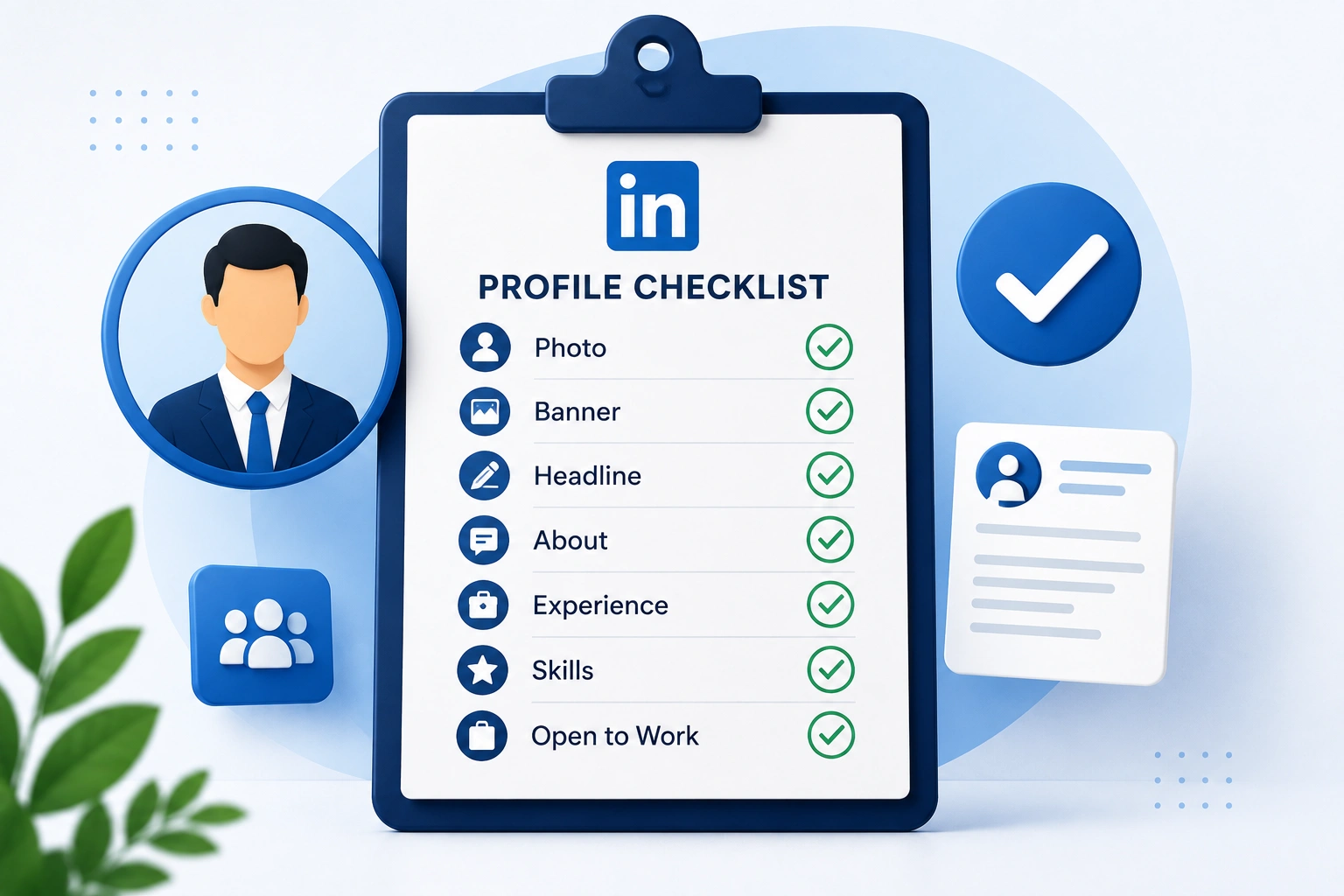
- Clear, professional photo (not a selfie or blank avatar)
- Custom banner image (not the default blue)
- Keyword-rich headline (role + specialty + target)
- First-person About section with achievements and numbers
- Experience with result-focused bullet points
- Relevant, role-specific skills added
- Custom profile URL (linkedin.com/in/yourname)
- Location and industry filled in
- “Open to Work” on — plus keywords in the headline
- Contact info added so recruiters can reach you
- Profile updated within the last month
- A few recent activities (posts, comments, or shares)

Conclusion and Action Plan
Your LinkedIn profile isn’t a formality. It’s a live listing in the database recruiters search every day. Make it findable with the right keywords, make it credible with a good photo and real results, and keep it active — and you shift from invisible to in-demand.
Your action plan this week:
- Add or upgrade your photo and banner.
- Rewrite your headline with your role, specialty, and target keywords.
- Refresh your About section into three human, keyword-rich paragraphs.
- Add result-focused bullets and a full set of relevant skills.
- Turn on “Open to Work,” set a custom URL, and post one small update.
Your LinkedIn and your resume should tell the same strong story. Create an ATS-friendly resume using Smart Resume Studio on WorkAnywhere.in to match your profile — and improve your chances of getting shortlisted for your next opportunity. Then browse the verified remote companies directory to find your next role.
Frequently Asked Questions
What makes a good LinkedIn profile? A good profile has a clear professional photo, a keyword-rich headline, a first-person About section, experience written as results, and relevant skills. Since recruiters search by keywords and judge in seconds, findability and a strong first impression matter most.
How do I make my LinkedIn profile visible to recruiters? Fill every section with the keywords recruiters search — job titles, skills, and tools — especially in your headline and skills. Turn on “Open to Work,” complete your profile fully, and stay lightly active. Complete, active profiles rank higher in search.
Do I need a photo on LinkedIn? Yes. LinkedIn’s own data shows profiles with a professional photo receive about 21x more views and 9x more connection requests than those without. A clear, friendly headshot is the single highest-impact change you can make to a weak profile.
What should my LinkedIn headline say? More than just your job title. Include your role, your specialty, and target keywords — for example, “Data Analyst | SQL, Python, Power BI | Open to Remote.” The headline is heavily weighted in search, so every word is a chance to be found.
How often should I update my LinkedIn profile? Keep it current and touch it at least monthly. LinkedIn’s algorithm favours fresh, active profiles, so a recently updated profile ranks above an identical dormant one. Occasional posts or comments also keep you visible in searches and feeds.
Should I turn on “Open to Work”? Yes, if you’re job hunting. Enable it and also add your target role to your headline text, since many recruiters filter by headline keywords. The green frame is optional; the keyword signal is what drives recruiter searches.
How is LinkedIn different from my resume? Your resume is tailored and sent to one job; LinkedIn is a public, searchable profile that recruiters find you through. Both should tell the same story, but LinkedIn needs broad keywords for discovery, while a resume is customised per application.
Can freshers and career switchers benefit from LinkedIn? Absolutely. Freshers can showcase projects, internships, and certifications with keywords, and switchers can front-load the new field’s terms in their headline and About. A complete profile helps both appear in searches they’d otherwise miss.
More from Remote Guide